# to it will not persist across an instance reboot.  To disable cloud-init's
# network configuration capabilities, write a file
# /etc/cloud/cloud.cfg.d/99-disable-network-config.cfg with the following:
# network: {config: disabled}
auto lo
iface lo inet loopback

auto eth0
iface eth0 inet dhcp
   dns-nameservers 185.12.64.2 185.12.64.1

# control-alias eth0
iface eth0 inet6 static
   address 2001:db8:1234::1/64
   dns-nameservers 2a01:4ff:ff00::add:1 2a01:4ff:ff00::add:2
   gateway fe80::1
I have been working on Hetzner's dedicated bare metal server management panel ("Robot") VNC Fedora 37 install, which is available for some dedicated servers (but not for all). Without using a KVM Spider one can install Fedora 37, upgrade to 38, and then upgrade to Rawhide.
Using the KVM Spider requires contacting support, waiting for support to set up the KVM spider, and then working under a three hour free usage time deadline or else paying a fee. That's why I got interested in your script, because it might provide an additional way of bypassing the KVM spider.
As of last night, Rawhide was installed on four servers. Maybe I might be satisfactorily using the VNC install method. 🍾
I will try your script soon. Maybe I will be able to make available a transcript of all the output I can see as the script runs. I can try the script on a dedicated server with SSD disks and on a dedicated server with NVMe disks. Initially, I will try to install Debian over the Rawhide.
More before too long! Thank you, as always, for your patience and kindness!
I tried the script! The script seemed to run successfully. It asked me to reboot to complete the Debian install. After reboot and waiting 15 minutes, the server responded to ping, but ssh root@$SERVER_IP got a "Connection refused" error.
I put the server into Hetzner's Linux Rescue mode. I mounted /dev/md1 to /mnt and saw what seemed to be a normal Debian system. Root login was set to without password, so I put an ssh key in /mnt/root/.ssh. After rebooting out of the Hetzner Rescue System, the server failed to respond to ping and I got no reply to ssh. I put the server back into the Hetzner Rescue System again.
I think I have transcripts of running the script and almost everything else.
Do you want to see the transcripts? Do you want me to put your ssh key in the Rescue System so you can see everything?
@Not-Oles #199 "Connection refused" is indicated that the new system seems to be installed successfully because this is an error about incorrect ssh key exchange method which returned by ssh service running on the newly installed Debian system, if installation is failed, it will return "Connection failed", so I recommend you to use Xshell or Putty client to connect to the server.









支持
@leitbogioro #183

https://blog.tanglu.me/dd/
感谢
不过我用了另外一个大佬的手动设置IP 网关 掩码参数成功DD了,
@zhoushao #192 你那台机器进Debian安装程序还会卡网关吗?我想确认一下我的改善是否有效,不然这类机器重装Linux还是有问题
@zhoushao #192 我查阅了一下Hetzner的官方文档,里面确实提到IPv4部分是可以用dhcp配置的,IPv6部分需要静态配置:
https://docs.hetzner.com/cloud/servers/primary-ips/primary-ip-configuration/
如果你不怕麻烦的话,可以试一下,既然你说那个商家的上游是Hetzner。
@leitbogioro #195
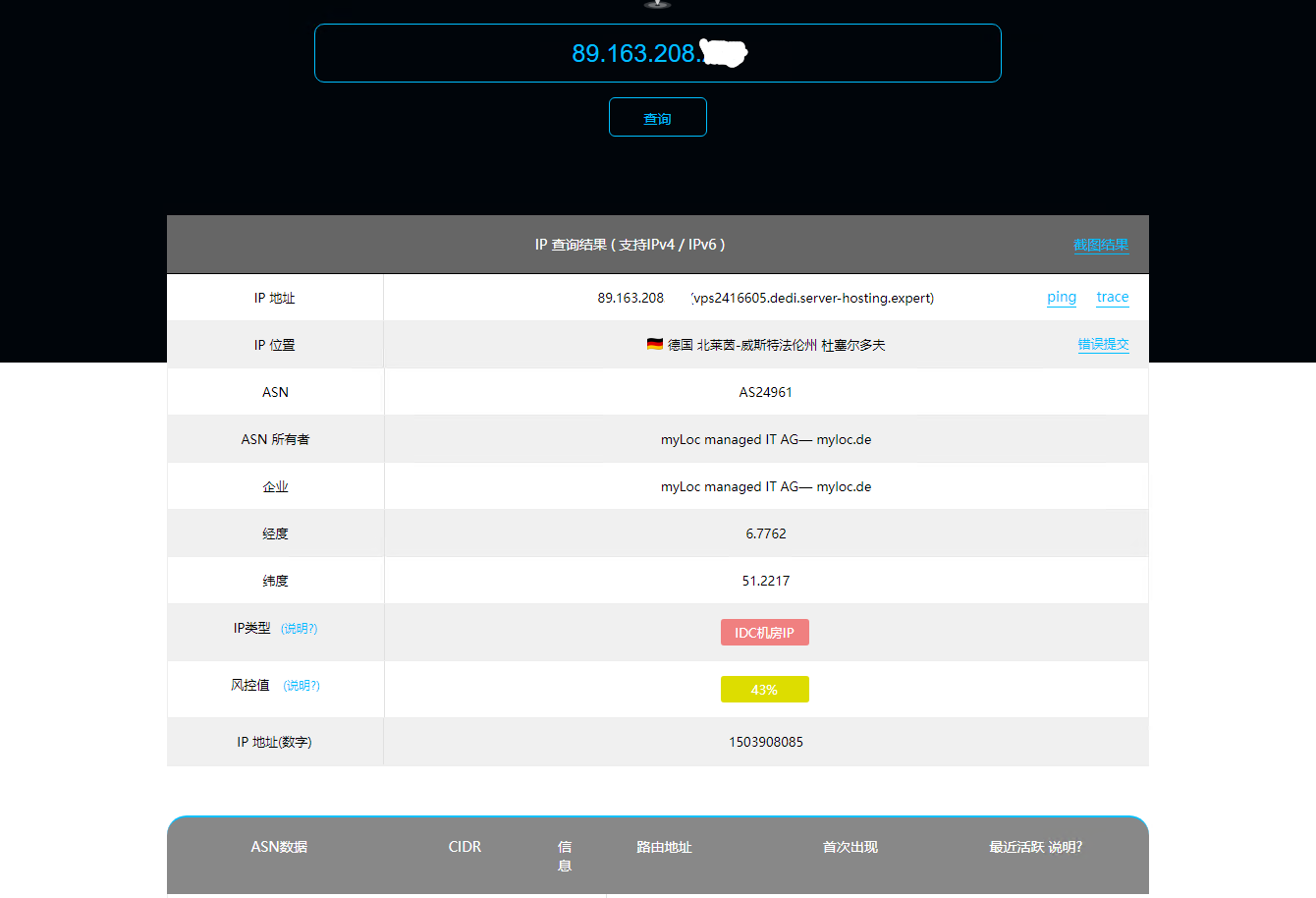
也不一定是Hetzner了
https://tk-hosting.com/在这里买的,
IP显示的信息
好的等这台机器过期了我买个更高配置的再试试,
@Not-Oles #186 Hey Sir, what's going on recently? did your machines have been prepared and try whether raid recipes are valid?
@leitbogioro #197
From Google Translate:
你好!
谢谢你的询问! 我很慢! 🐢对不起!
我一直致力于 Hetzner 的专用裸机服务器管理面板(“机器人”)VNC Fedora 37 安装,该安装适用于某些专用服务器(但不适用于所有服务器)。 在不使用 KVM Spider 的情况下,可以安装 Fedora 37,升级到 38,然后升级到 Rawhide。
使用 KVM 蜘蛛需要联系支持人员,等待支持人员设置 KVM 蜘蛛,然后在三小时免费使用期限内工作,否则需要付费。 这就是我对你的脚本感兴趣的原因,因为它可能提供另一种绕过 KVM 蜘蛛的方法。
截至昨晚,Rawhide 已安装在四台服务器上。 也许我使用VNC安装方法可能会令人满意。 🍾
我很快就会尝试你的脚本。 也许我将能够提供脚本运行时我可以看到的所有输出的记录。 我可以在带有 SSD 磁盘的专用服务器和带有 NVMe 磁盘的专用服务器上尝试该脚本。 最初,我将尝试在 Rawhide 上安装 Debian。
不久之后还会有更多! 一如既往,感谢您的耐心和友善!
最好的祝愿!
Tom
My English original:
Hello!
Thanks for asking! I am slow! 🐢 Sorry!
I have been working on Hetzner's dedicated bare metal server management panel ("Robot") VNC Fedora 37 install, which is available for some dedicated servers (but not for all). Without using a KVM Spider one can install Fedora 37, upgrade to 38, and then upgrade to Rawhide.
Using the KVM Spider requires contacting support, waiting for support to set up the KVM spider, and then working under a three hour free usage time deadline or else paying a fee. That's why I got interested in your script, because it might provide an additional way of bypassing the KVM spider.
As of last night, Rawhide was installed on four servers. Maybe I might be satisfactorily using the VNC install method. 🍾
I will try your script soon. Maybe I will be able to make available a transcript of all the output I can see as the script runs. I can try the script on a dedicated server with SSD disks and on a dedicated server with NVMe disks. Initially, I will try to install Debian over the Rawhide.
More before too long! Thank you, as always, for your patience and kindness!
Best wishes!
Tom
@leitbogioro #197
From Google Translate:
你好!
我尝试了剧本! 该脚本似乎运行成功。 它要求我重新启动以完成 Debian 安装。 重新启动并等待 15 分钟后,服务器响应 ping,但 ssh root@$SERVER_IP 收到“连接被拒绝”错误。
我将服务器置于 Hetzner 的 Linux Rescue 模式。 我将 /dev/md1 安装到 /mnt 并看到似乎是正常的 Debian 系统。 root 登录设置为无密码,因此我将 ssh 密钥放入 /mnt/root/.ssh 中。 退出 Hetzner 救援系统后,服务器无法响应 ping,我也没有收到 ssh 的回复。 我再次将服务器放回 Hetzner 救援系统。
我想我有运行脚本和几乎所有其他内容的记录。
你想看成绩单吗? 您希望我将您的 ssh 密钥放入救援系统以便您可以看到所有内容吗?
非常感谢!
My English original:
Hello!
I tried the script! The script seemed to run successfully. It asked me to reboot to complete the Debian install. After reboot and waiting 15 minutes, the server responded to ping, but
ssh root@$SERVER_IPgot a "Connection refused" error.I put the server into Hetzner's Linux Rescue mode. I mounted /dev/md1 to /mnt and saw what seemed to be a normal Debian system. Root login was set to without password, so I put an ssh key in /mnt/root/.ssh. After rebooting out of the Hetzner Rescue System, the server failed to respond to ping and I got no reply to ssh. I put the server back into the Hetzner Rescue System again.
I think I have transcripts of running the script and almost everything else.
Do you want to see the transcripts? Do you want me to put your ssh key in the Rescue System so you can see everything?
Thanks so much!
Tom
坦
@Not-Oles #199 "Connection refused" is indicated that the new system seems to be installed successfully because this is an error about incorrect ssh key exchange method which returned by ssh service running on the newly installed Debian system, if installation is failed, it will return "Connection failed", so I recommend you to use Xshell or Putty client to connect to the server.