For at least the next two or three weeks I have two physical, bare metal servers at Hetzner. Each server has two disks -- all disks are SSD, none are NVMe. One server is running Fedora Rawhide and Btrfs with compression. The other server is running Debian 12 with ext4 and RAID 0. The previous server, which was returned to Hetzner, had 2 NVMe drives. I will let you know when I get another physical, bare metal server with NVMe disks. It will be some weeks at least, probably longer.
I also currently have two aarm KVM non-metal instances at Oracle Cloud. One is running the development version of Oracle Linux and the other is running Ubuntu.
It would be fine with me if you take one physical or KVM server (or all of them one by one) for a day or two to test your script. You can install whatever you want. You do not have to worry about breaking anything. 😃 If you need a server for longer than a day or two, please tell me about it, and I will see what I can do.
If you have more questions, please ask. Thanks again!
@Not-Oles #186 The functions of raid 0 1 5 6 or 10 auto recipe (only for Debian 10+) were all tested pass on my local VMware environment, included UEFI and BIOS, and then I simulated a list of several conditions like 2, 3 and 4 hard drives were existed with different bus controller which were combined in one system or when they arranged with raid 5 or other recipes, to reinstall to raid 0 or raid 6 or raid 10 partitions were also gained successfully etc:
/dev/sda
/dev/sdb
/dev/nvme0n1
/dev/nvme0n2
The total tests were not seen any obvious fatal and I'm sure these recipes are not only compatible with Debian but also suitable for Kali rolling, the critical two basic requirement are:
All disks should have the same space otherwise the available space of raid will only depends on the smallest space one.
Raid 0 or 1 needs at least a set of dual hard drive, the same condition for Raid 5 is triple hard drive, for Raid 6 and 10 is quad hard drive. Raid 0 can exploit all spaces of disks and has the highest performance, the performance of Raid 1 is same as Raid 0 but can only use one disks' spaces, it's safest to the data. Raid 5 is safer than Raid 0 and the 2/3 spaces of all disks can be exploited, but it's not suggested on any single disk is 3TB above because once one disk is failed, the "Raw Read Error Rate" is unacceptable in this case. Raid 6 is an optimized formula better than Raid 5 and the 3/4 spaces of all disks can be exploited at most. Raid 10 is a common method and used in many enterprises, the 1/2 space can be exploited, you can select a best recipe for yourself according to archive a balance among the economy, safety and performance.
You can just execute:
bash InstallNET.sh -debian 12 -raid "0"
Haha, okay. I will read the script again and try it. I will let you know what happens. 😃
I made a mistake in my post above, #186. I said none of the disks on the servers I have are NVMe. However, one server does have SAMSUNG MZVLB1T0HBLR which is NVMe. Maybe I will try your script on that server. 😃
@Not-Oles #188 Okay, whether names of hard drives are different has no effect on automatic Raid recipes, just ensure that all drives have the same size.









@CloudPassenger #178
(图片在imgur,需要挂梯子全局访问)
我刚才用圣地亚哥的AMD64 Oracle Linux 8.7重装了一下,需要花费的时间很长,最好添加 -mirror,指定机器所在地的镜像源,这样能快一点装好,比如我使用的是智利的Debian源:
bash InstallNET.sh -debian 12 -port "65432" -mirror "http://ftp.cl.debian.org/debian/"新建机器时的状态:
原系统版本:
重启前打印的信息:
重启后连启动到安装程序都很慢,要卡十几二十几秒,一般机器没这么慢,这个是由机器本身性能决定,用哪个脚本都一样:
我这次实验测算过,即使就近优选Debian源,从20:54第一次重启,到21:07第二次重启到正式系统,需要花费13分钟,速度还可以,可能是连接源的速度快:
重装后状态:
IP归属地信息,显示确实为Oracle:
@leitbogioro #180
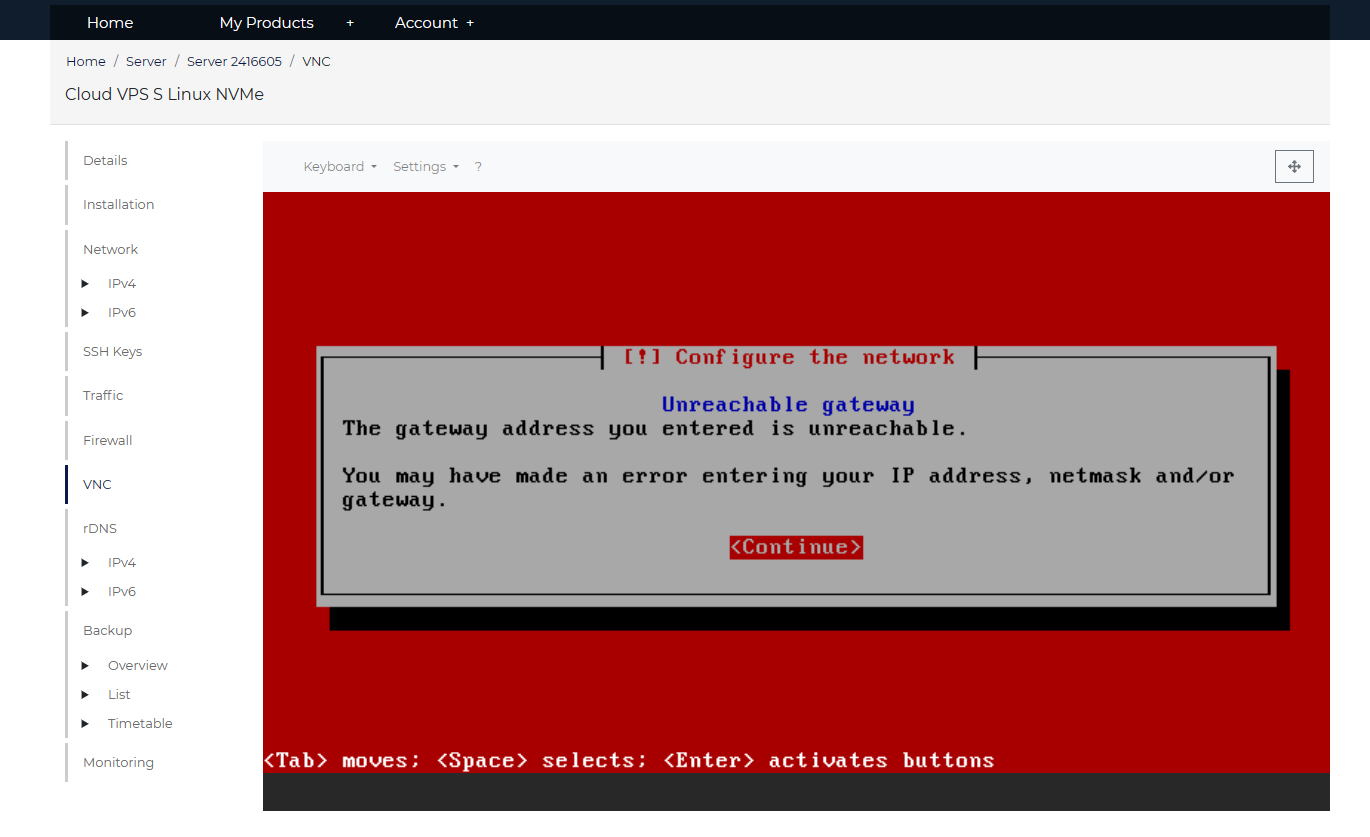
大佬按照教程提示DD windows不成功 VNC截图
配置4h8G
@zhoushao #182
DD Windows实现的方法是先启动一个Debian安装程序,然后把Windows DD包D到系统里,所以问题是先要过了Debian安装程序能正常配置网络这一关。
这个Hetzner简直就是重装红框大王,上级网路配置一个比一个抽象。比如在你这台机器中,主IPv4为89.163.208.5,网关为169.254.0.1,静态配置,即使子网用128.0.0.0来尽可能大扩展地址范围,但还是会报错。
原因很明显,根据IPv4地址和掩码计算一下可知,即使在最大范围下,0.0.0.1-127.255.255.254,网关169.254.0.1还是不能被包含其中,很难想象给这种配置的人的精神状态是否正常。
解决方法就是如果检查到IPv4和网关如果不在同一个A类网段,且即使掩码给128.0.0.0(prefix 1)让IPv4范围扩展到最大,以找到网关也报unreachable gateway的情况下,强制指派IPv4按dhcp配置,我记得Hetzner IPv4是支持dhcp的,IPv4掩码prefix 1已经表示范围是最大了,这个值只能在1-32,数字越大,范围越小,不能给0甚至是负数,给1都无法包含网关,给其他值则更不可能包含网关,只能尝试用dhcp配置,让这种错误直接继承于上级路由,dhcp情况下,即使网络配置存在上述不合理之处,Debian安装程序是能处理的。
在后台把系统重装一下,然后重下脚本跑一遍试试吧,如果还不行就真没办法了。
牛逼,技术大佬。
支持大佬,大佬牛逼!!!!!
@leitbogioro #177
你好!
謝謝你的問題! 😃
至少在接下來的兩三週內,我在 Hetzner 擁有兩台物理裸機服務器。 每台服務器有兩個磁盤——所有磁盤都是SSD,沒有一個是NVMe。 一台服務器運行 Fedora Rawhide 和帶壓縮功能的 Btrfs。 另一台服務器運行帶有 ext4 和 RAID 0 的 Debian 12。之前返回給 Hetzner 的服務器有 2 個 NVMe 驅動器。 當我獲得另一台帶有 NVMe 磁盤的物理裸機服務器時,我會通知您。 至少需要幾個星期,甚至可能更長。
我目前在 Oracle Cloud 上還有兩個 aarm KVM 非金屬實例。 一個運行 Oracle Linux 的開發版本,另一個運行 Ubuntu。
如果您使用一台物理服務器或 KVM 服務器(或所有服務器一台接一台)一兩天來測試您的腳本,那對我來說沒問題。 您可以安裝任何您想要的東西。 您不必擔心會損壞任何東西。 😃 如果您需要服務器超過一兩天,請告訴我,我會看看我能做什麼。
如果您還有更多問題,請詢問。 再次感謝!
最好的!
坦
@leitbogioro #177
Hello!
Thank you for your question! 😃
For at least the next two or three weeks I have two physical, bare metal servers at Hetzner. Each server has two disks -- all disks are SSD, none are NVMe. One server is running Fedora Rawhide and Btrfs with compression. The other server is running Debian 12 with ext4 and RAID 0. The previous server, which was returned to Hetzner, had 2 NVMe drives. I will let you know when I get another physical, bare metal server with NVMe disks. It will be some weeks at least, probably longer.
I also currently have two aarm KVM non-metal instances at Oracle Cloud. One is running the development version of Oracle Linux and the other is running Ubuntu.
It would be fine with me if you take one physical or KVM server (or all of them one by one) for a day or two to test your script. You can install whatever you want. You do not have to worry about breaking anything. 😃 If you need a server for longer than a day or two, please tell me about it, and I will see what I can do.
If you have more questions, please ask. Thanks again!
Best!
Tom
@Not-Oles #186 The functions of raid 0 1 5 6 or 10 auto recipe (only for Debian 10+) were all tested pass on my local VMware environment, included UEFI and BIOS, and then I simulated a list of several conditions like 2, 3 and 4 hard drives were existed with different bus controller which were combined in one system or when they arranged with raid 5 or other recipes, to reinstall to raid 0 or raid 6 or raid 10 partitions were also gained successfully etc:
/dev/sda
/dev/sdb
/dev/nvme0n1
/dev/nvme0n2
The total tests were not seen any obvious fatal and I'm sure these recipes are not only compatible with Debian but also suitable for Kali rolling, the critical two basic requirement are:
All disks should have the same space otherwise the available space of raid will only depends on the smallest space one.
Raid 0 or 1 needs at least a set of dual hard drive, the same condition for Raid 5 is triple hard drive, for Raid 6 and 10 is quad hard drive. Raid 0 can exploit all spaces of disks and has the highest performance, the performance of Raid 1 is same as Raid 0 but can only use one disks' spaces, it's safest to the data. Raid 5 is safer than Raid 0 and the 2/3 spaces of all disks can be exploited, but it's not suggested on any single disk is 3TB above because once one disk is failed, the "Raw Read Error Rate" is unacceptable in this case. Raid 6 is an optimized formula better than Raid 5 and the 3/4 spaces of all disks can be exploited at most. Raid 10 is a common method and used in many enterprises, the 1/2 space can be exploited, you can select a best recipe for yourself according to archive a balance among the economy, safety and performance.
You can just execute:
bash InstallNET.sh -debian 12 -raid "0"@leitbogioro #187
Haha, okay. I will read the script again and try it. I will let you know what happens. 😃
I made a mistake in my post above, #186. I said none of the disks on the servers I have are NVMe. However, one server does have SAMSUNG MZVLB1T0HBLR which is NVMe. Maybe I will try your script on that server. 😃
Thanks again!
@Not-Oles #188 Okay, whether names of hard drives are different has no effect on automatic Raid recipes, just ensure that all drives have the same size.
@leitbogioro #189
Thanks!