

其他不多说了,直接看图吧
我这个信息头的图是我探针风格的图,
不知道除了TG通知用的多,还哪里用的多,看要不要搞个其他的通知模版也
使用方法,我以为都知道了,现在补充下
komari 设置里面 有个通知,通知里面的 "通知渠道" 改成 JavaScript ,然后复制代码进去改改就行了。
至于怎么申请机器人 ,我是 @BotFather 这个里面申请的
至于如何知道client id 也就是chatid
若需要发送给 Telegram 用户,则为 用户 ID (可私聊 @nmnmfunbot 发送 /id 获取)
若发送到群组,则为群组 ID (需要 Bot 在群组内,群组 ID 可拉入 @nmnmfunbot 并在群组内发送 /id 获取) (出自 komari 群的详细教程 )
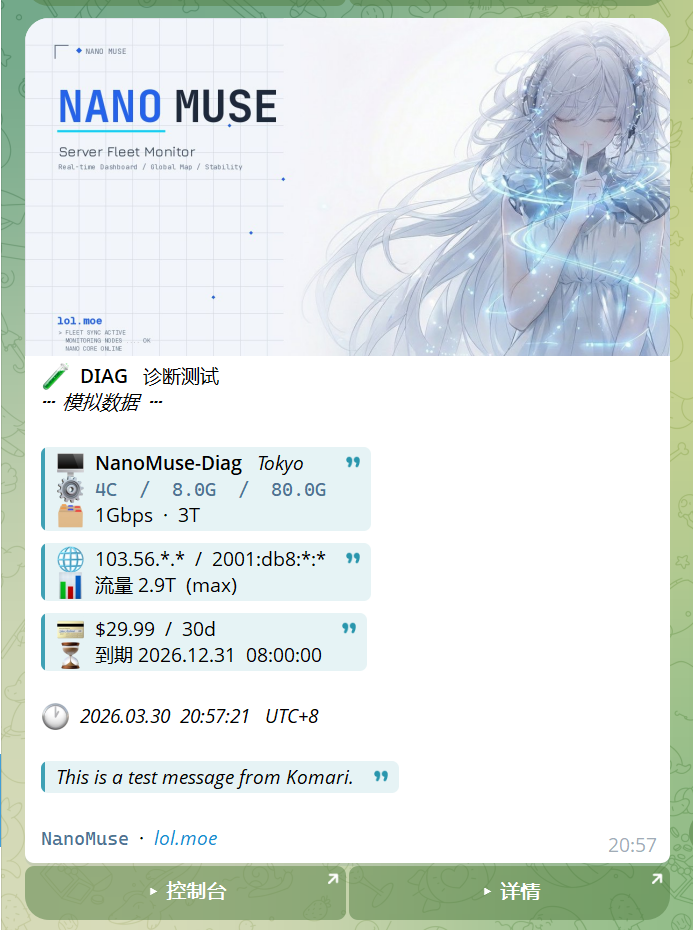
还有最下面
L.push(`<code>NanoMuse</code> · <i>lol.moe</i>`);
倒数第几行 改改,改成你们的名称和 网址。否则给显示我探针了地址了,
代码如下
/* ═══════════════════════════════
   NanoMuse · TG 通知配置
   ═══════════════════════════════ */
const TG_TOKEN   = "你的TG机器人 TOKEN";
const TG_CHAT_ID = "你的 clientID";
const PANEL_URL  = "你的网站域名";
const PHOTO_URL  = "你的通知图片头地址";
/* ═══════════════════════════════ */

async function sendMessage(message, title, instanceId = null) {
  const token = TG_TOKEN;
  const chatId = TG_CHAT_ID;
  const panelUrl = PANEL_URL;
  const photoUrl = PHOTO_URL;

  if (!token || !chatId) return false;

  let inline_keyboard = [];
  let row = [{ text: "▸ 控制台", url: panelUrl }];
  if (instanceId && instanceId !== '未知') {
    row.push({ text: "▸ 详情", url: `${panelUrl}/instance/${instanceId}` });
  }
  inline_keyboard.push(row);

  try {
    const photoResp = await fetch(`https://api.telegram.org/bot${token}/sendPhoto`, {
      method: 'POST',
      headers: { 'Content-Type': 'application/json' },
      body: JSON.stringify({
        chat_id: chatId,
        photo: photoUrl,
        caption: message,
        parse_mode: 'HTML',
        reply_markup: { inline_keyboard }
      }),
    });
    if (photoResp.ok) return true;
  } catch (e) {}

  const resp = await fetch(`https://api.telegram.org/bot${token}/sendMessage`, {
    method: 'POST',
    headers: { 'Content-Type': 'application/json' },
    body: JSON.stringify({
      chat_id: chatId,
      text: message,
      parse_mode: 'HTML',
      reply_markup: { inline_keyboard }
    }),
  });
  return resp.ok;
}

async function sendEvent(event) {
  try {
    const toUTC8 = (t) => {
      if (!t || String(t).startsWith('0001')) return null;
      const d = new Date(String(t).replace(/\.\d+Z$/, 'Z'));
      if (isNaN(d.getTime())) return null;
      const u = new Date(d.getTime() + 8 * 36e5);
      const p = (n) => String(n).padStart(2, '0');
      return `${u.getUTCFullYear()}.${p(u.getUTCMonth()+1)}.${p(u.getUTCDate())}  ${p(u.getUTCHours())}:${p(u.getUTCMinutes())}:${p(u.getUTCSeconds())}`;
    };

    const nowUTC8 = () => {
      const u = new Date(Date.now() + 8 * 36e5);
      const p = (n) => String(n).padStart(2, '0');
      return `${u.getUTCFullYear()}.${p(u.getUTCMonth()+1)}.${p(u.getUTCDate())}  ${p(u.getUTCHours())}:${p(u.getUTCMinutes())}:${p(u.getUTCSeconds())}`;
    };

    const fmtSize = (b) => {
      if (!b || b === 0) return null;
      const g = b / 1073741824;
      return g >= 1024 ? `${(g/1024).toFixed(1)}T` : g >= 1 ? `${g.toFixed(1)}G` : `${Math.round(b/1048576)}M`;
    };

    const fmtCPU = (c) => (!c ? null : parseFloat(Number(c).toFixed(1)) + 'C');

    const fmtTraffic = (b) => {
      if (!b || b === 0) return '∞';
      const g = b / 1073741824;
      return g >= 1024 ? `${(g/1024).toFixed(1)}T` : `${g.toFixed(0)}G`;
    };

    const maskV4 = (ip) => {
      if (!ip) return null;
      const p = ip.split('.');
      return p.length === 4 ? `${p[0]}.${p[1]}.*.*` : null;
    };

    const maskV6 = (ip) => {
      if (!ip) return null;
      const p = ip.split(':');
      return p.length > 2 ? `${p[0]}:${p[1]}:*:*` : null;
    };

    const evMap = {
      'Offline': { tag: 'OFFLINE', cn: '节点离线', icon: '🔴' },
      'Online':  { tag: 'ONLINE',  cn: '节点上线', icon: '🟢' },
      'Alert':   { tag: 'ALERT',   cn: '监控告警', icon: '⚠️' },
      'Renew':   { tag: 'RENEW',   cn: '已续费',   icon: '💳' },
      'Expire':  { tag: 'EXPIRE',  cn: '即将到期', icon: '⏳' },
      'Test':    { tag: 'DIAG',    cn: '诊断测试', icon: '🧪' }
    };
    const ev = evMap[event.event] || { tag: event.event, cn: event.event, icon: '⚪' };

    const mockClient = {
      uuid: 'diag-0000-nano-muse',
      name: 'NanoMuse-Diag',
      region: 'Tokyo',
      cpu_cores: 4,
      mem_total: 8589934592,
      disk_total: 85899345920,
      tags: '1Gbps<green>;3T<blue>',
      ipv4: '103.56.168.1',
      ipv6: '2001:db8:cafe:1::1',
      traffic_limit: 3221225472000,
      traffic_limit_type: 'max',
      price: 29.99,
      currency: '$',
      billing_cycle: 30,
      expired_at: '2026-12-31T00:00:00Z'
    };

    const hasClients = event.clients && event.clients.length > 0;
    const isMock = !hasClients && event.event === 'Test';
    const c = hasClients ? event.clients[0] : (isMock ? mockClient : null);
    const targetId = c ? c.uuid : null;

    let L = [];

    /* Header */
    L.push(`${ev.icon}  <b>${ev.tag}</b>   ${ev.cn}`);
    if (isMock) L.push(`<i>┄  模拟数据  ┄</i>`);

    if (c) {
      const name = c.name || '—';
      const region = c.region || '';

      /* Block 1: 节点 + 配置 + 标签 */
      let b1 = [];
      b1.push(`🖥  <b>${name}</b>` + (region ? `   <i>${region}</i>` : ''));

      const specs = [fmtCPU(c.cpu_cores), fmtSize(c.mem_total), fmtSize(c.disk_total)].filter(Boolean);
      if (specs.length) b1.push(`⚙  <code>${specs.join('  /  ')}</code>`);

      if (c.tags) {
        const labels = c.tags.split(';').map(t => t.replace(/<[^>]+>/g, '').trim()).filter(Boolean);
        if (labels.length) b1.push(`🗂  ${labels.join('  ·  ')}`);
      }

      L.push('');
      L.push(`<blockquote>${b1.join('\n')}</blockquote>`);

      /* Block 2: IP + 流量 */
      let b2 = [];
      const v4 = maskV4(c.ipv4);
      const v6 = maskV6(c.ipv6);
      if (v4 || v6) b2.push(`🌐  ${[v4, v6].filter(Boolean).join('  /  ')}`);

      if (c.traffic_limit && c.traffic_limit > 0) {
        let tl = `📊  流量 ${fmtTraffic(c.traffic_limit)}`;
        if (c.traffic_limit_type) tl += `  (${c.traffic_limit_type})`;
        b2.push(tl);
      }

      if (b2.length) L.push(`<blockquote>${b2.join('\n')}</blockquote>`);

      /* Block 3: 账单 + 到期 (renew/expire/test) */
      if (event.event === 'Renew' || event.event === 'Expire' || event.event === 'Test') {
        let b3 = [];
        const cur = c.currency || '$';
        const price = c.price || 0;
        const cycle = c.billing_cycle ? `${c.billing_cycle}d` : '';
        if (price > 0) {
          b3.push(`💳  ${cur}${price}${cycle ? '  /  ' + cycle : ''}`);
          const expStr = toUTC8(c.expired_at);
          if (expStr) b3.push(`⏳  到期 ${expStr}`);
        }
        if (b3.length) L.push(`<blockquote>${b3.join('\n')}</blockquote>`);
      }
    }

    L.push('');
    L.push(`🕐  <i>${toUTC8(event.time) || nowUTC8()}   UTC+8</i>`);

    if (event.message && event.message.trim()) {
      L.push('');
      L.push(`<blockquote><i>${event.message.trim()}</i></blockquote>`);
    }

    L.push('');
    L.push(`<code>NanoMuse</code>  ·  <i>lol.moe</i>`);

    return await sendMessage(L.join('\n'), '', targetId);

  } catch (e) {
    return await sendMessage(`Error: ${e.message}`, '⚠️ Error');
  }
}








牛逼
牛逼
cy tg通知美化模板
哇 真好看
不过这是干嘛用的
探针掉线,负载高,各种啥的,tg机器人通知用的模版
如何食用?
图片地址给一个大哥
这怎么用的
牛逼
cy 探针通知