

折腾了一晚上,终于弄好了,以往的帖子已经写得很详细了,所以本贴只是简单把大佬们的教程整理了一下,顺便写个步骤,也方便自己以后看。
我都是抄的大佬轻点打 
这里将
解锁较好的机器成为解锁鸡(ip: 1.2.3.4),
解锁不好(需要分流解锁)的机器叫做被解锁鸡(ip: 9.9.9.9)。
将按 解锁鸡配置 被解锁鸡配置 两部分进行
分流规则:https://github.com/blackmatrix7/ios_rule_script/tree/master/rule
1.前提条件:
解锁鸡放行53、80、443端口
例如
ss -tulnp | grep 443
tcp LISTEN 0 128 0.0.0.0:443 0.0.0.0:* users:(("nginx",pid=1234,fd=6))
systemctl stop nginx
2.解锁鸡
(1) 安装Dnsmasq SNIproxy One-click Install
【Github】dnsmasq_sniproxy_install
sudo apt install net-tools
sudo apt update
wget --no-check-certificate -O dnsmasq_sniproxy.sh https://raw.githubusercontent.com/myxuchangbin/dnsmasq_sniproxy_install/master/dnsmasq_sniproxy.sh && bash dnsmasq_sniproxy.sh -f
#注意 我用debian13安装时出现错误,搜了一下,说是 libpcre3-dev 软件包在 Debian 13 (Trixie) 的官方源中已经不可用,所以在进行 (1) 之前先手动安装 libpcre3-dev 。后面等大佬适配吧。以下是ai给出的步骤,安装 Dnsmasq SNIproxy One-click Install 之前先执行这个:
# debian13
wget http://ftp.debian.org/debian/pool/main/p/pcre3/libpcre3-dev_8.39-13_amd64.deb
wget http://ftp.debian.org/debian/pool/main/p/pcre3/libpcre3_8.39-13_amd64.deb
wget http://ftp.debian.org/debian/pool/main/p/pcre3/libpcre16-3_8.39-13_amd64.deb
wget http://ftp.debian.org/debian/pool/main/p/pcre3/libpcre32-3_8.39-13_amd64.deb
wget http://ftp.debian.org/debian/pool/main/p/pcre3/libpcrecpp0v5_8.39-13_amd64.deb
sudo dpkg -i libpcre3_8.39-13_amd64.deb
sudo dpkg -i libpcre16-3_8.39-13_amd64.deb
sudo dpkg -i libpcre32-3_8.39-13_amd64.deb
sudo dpkg -i libpcrecpp0v5_8.39-13_amd64.deb
sudo dpkg -i libpcre3-dev_8.39-13_amd64.deb
#验证安装
dpkg -l | grep libpcre3-dev
#验证sniproxy状态
systemctl status sniproxy
# 显示 Active: active (running)
(2) 配置防火墙,防止被滥用
【教程】通过解锁服务器自建DNS实现流媒体解锁
【教程】关于DNS分流
apt-get update
apt-get install iptables

# 将需要的ip(被解锁鸡)放行
iptables -I INPUT -s 9.9.9.9 -p tcp --dport 443 -j ACCEPT
iptables -I INPUT -s 9.9.9.9 -p udp --dport 443 -j ACCEPT
iptables -I INPUT -s 9.9.9.9 -p tcp --dport 53 -j ACCEPT
iptables -I INPUT -s 9.9.9.9 -p udp --dport 53 -j ACCEPT

# 拒绝其他ip
iptables -A INPUT -p tcp --dport 443 -j DROP
iptables -A INPUT -p udp --dport 443 -j DROP
iptables -A INPUT -p tcp --dport 53 -j DROP
iptables -A INPUT -p udp --dport 53 -j DROP

#保存
#apt-get install -y netfilter-persistent
netfilter-persistent save
# 若要删除规则
iptables -L -n --line-numbers
sudo iptables -D INPUT <行号>
(3) 配置分流域名
[教程]利用sni代理和smartdns自建DNS解锁
需要配置文件/etc/sniproxy.conf
nano /etc/sniproxy.conf
# 或 vi /etc/sniproxy.conf

#在 table 中添加要分流的域名
table {
.*ai\.com$ *
.*openai\.com$ *
.*chatgpt.com$ *
.*oaistatic.com$ *
.*oaiusercontent.com$ *
}
以下是我添加的一些:
来源:https://www.notion.so/23868ba547e280ef975cf7a2b4eca962 然后交给ai整理
将以下内容
# Fallback, forward all other traffic to its original destination
.* *
加到
table {
        .*ai\.com$ *

        ...
	...

	# Fallback, forward all other traffic to its original destination
        .* *
       }
之中。(或者只保留 .* * )
添加之后重启sniproxy
systemctl restart sniproxy
3.被解锁鸡
这里用【技术】手把手教你用AdguradHome+SNIProxy自建DNS解锁服务器 中大佬写的:DNS 解锁专用脚本 修改dns
(1) 安装DNS-Alice-Unlock
wget https://raw.githubusercontent.com/hkfires/DNS-Alice-Unlock/main/dns-alice-unlock.sh && chmod +x dns-alice-unlock.sh && bash dns-alice-unlock.sh
# 可用快捷方式 dns 再次进入
这里我选择的是SmartDNS,依次选择:
3. SmartDNS DNS分流 --> 1. 安装并配置 SmartDNS --> 4. 自定义 IPv4 地址
自定义 IPv4 地址 填写解锁鸡的IP: 1.2.3.4
(2) 编辑分流域名
编辑 /etc/smartdns/smartdns.conf 文件:
vi /etc/smartdns/smartdns.conf
点击 Esc,之后输入 :%d 删除全部内容
之后粘贴以下内容(分流规则可参考文章开头链接):
bind :53@lo -no-dualstack-selection -no-speed-check
# bind [::]:53
dualstack-ip-selection no
speed-check-mode none
serve-expired-prefetch-time 21600
prefetch-domain yes
cache-size 32768
cache-persist yes
cache-file /etc/smartdns/cache
serve-expired yes
serve-expired-ttl 259200
serve-expired-reply-ttl 3
cache-checkpoint-time 86400

server 8.8.8.8
server 1.1.1.1
# server 1.2.3.4 -group dnsproxy -exclude-default-group
# nameserver /netflix.com/dnsproxy
# 这里我如果使用nameserver,解锁鸡/etc/sniproxy.conf只配置.* *的情况下
# 有的能够分流成功,但是有的会失败,现在还没弄明白,这里直接使用address了

#Netflix
address /netflix.ca/1.2.3.4
address /netflixinvestor.com/1.2.3.4
address /netflixtechblog.com/1.2.3.4
address /netflix.com.edgesuite.net/1.2.3.4
address /netflix.com/1.2.3.4
address /netflix.net/1.2.3.4
address /nflxext.com/1.2.3.4
address /nflximg.com/1.2.3.4
address /nflximg.net/1.2.3.4
address /nflxso.net/1.2.3.4
address /nflxvideo.net/1.2.3.4
address /nflxsearch.net/1.2.3.4
address /netflixdnstest1.com/1.2.3.4
address /netflixdnstest2.com/1.2.3.4
address /netflixdnstest3.com/1.2.3.4
address /netflixdnstest4.com/1.2.3.4
address /netflixdnstest5.com/1.2.3.4
address /netflixdnstest6.com/1.2.3.4
address /netflixdnstest7.com/1.2.3.4
address /netflixdnstest8.com/1.2.3.4
address /netflixdnstest9.com/1.2.3.4
address /netflixdnstest10.com/1.2.3.4

#Disney+
address /bamgrid.com/1.2.3.4
address /disneyplus.com/1.2.3.4
address /disney-plus.net/1.2.3.4
address /disneystreaming.com/1.2.3.4
address /dssott.com/1.2.3.4
address /cdn.registerdisney.go.com/1.2.3.4
address /disneynow.com/1.2.3.4
address /disneyjunior.com/1.2.3.4

#OpenAI
address /ai.com/1.2.3.4
address /chat.com/1.2.3.4
address /sora.com/1.2.3.4
address /openai.com/1.2.3.4
address /chatgpt.com/1.2.3.4
address /oaistatic.com/1.2.3.4
address /oaiusercontent.com/1.2.3.4
address /openaicom.imgix.net/1.2.3.4
address /o33249.ingest.sentry.io/1.2.3.4
address /openai.com.cdn.cloudflare.net/1.2.3.4
address /openaiapi-site.azureedge.net/1.2.3.4
address /production-openaicom-storage.azureedge.net/1.2.3.4
address /openaicomproductionae4b.blob.core.windows.net/1.2.3.4
address /openaicom-api-bdcpf8c6d2e9atf6.z01.azurefd.net/1.2.3.4
address /api.statsig.com/1.2.3.4
address /turn.livekit.cloud/1.2.3.4
address /chatgpt.livekit.cloud/1.2.3.4
address /browser-intake-datadoghq.com/1.2.3.4
address /host.livekit.cloud/1.2.3.4

#Gemini
address /deepmind.com/1.2.3.4
address /deepmind.google/1.2.3.4
address /geller-pa.googleapis.com/1.2.3.4
address /generativelanguage.googleapis.com/1.2.3.4
address /proactivebackend-pa.googleapis.com/1.2.3.4
address /ai.google.dev/1.2.3.4
address /alkalicore-pa.clients6.google.com/1.2.3.4
address /alkalimakersuite-pa.clients6.google.com/1.2.3.4
address /webchannel-alkalimakersuite-pa.clients6.google.com/1.2.3.4
address /generativeai.google/1.2.3.4
address /makersuite.google.com/1.2.3.4
address /aistudio.google.com/1.2.3.4
address /bard.google.com/1.2.3.4
address /gemini.google/1.2.3.4
address /gemini.google.com/1.2.3.4
address /notebooklm.google/1.2.3.4
address /notebooklm.google.com/1.2.3.4
address /jules.google/1.2.3.4
address /jules.google.com/1.2.3.4

#Tiktok
address /byteoversea.com/1.2.3.4
address /muscdn.com/1.2.3.4
address /musical.ly/1.2.3.4
address /tik-tokapi.com/1.2.3.4
address /tiktok.com/1.2.3.4
address /tiktokcdn-eu.com/1.2.3.4
address /tiktokcdn-us.com/1.2.3.4
address /tiktokcdn.com/1.2.3.4
address /tiktokd.net/1.2.3.4
address /tiktokd.org/1.2.3.4
address /tiktokeu-cdn.com/1.2.3.4
address /tiktokrow-cdn.com/1.2.3.4
address /tiktokv.com/1.2.3.4
address /tiktokv.eu/1.2.3.4
address /tiktokv.us/1.2.3.4
address /tiktokw.eu/1.2.3.4
address /tiktokw.us/1.2.3.4
address /ttlivecdn.com/1.2.3.4
address /ttoverseaus.net/1.2.3.4
address /ttwstatic.com/1.2.3.4
address /p16-tiktokcdn-com.akamaized.net/1.2.3.4
address /ibytedtos.com/1.2.3.4
address /ipstatp.com/1.2.3.4

#YouTube
address /youtube.com/1.2.3.4
address /youtube.googleapis.com/1.2.3.4
(3) 重启 smartdns
systemctl restart smartdns
4.测试
被解锁鸡输入:
apt-get -y install dnsutils
yum install -y bind-utils

nslookup Netflix.com
应该返回解锁鸡的ip,例如:
Server:         127.0.0.1
Address:        127.0.0.1#53

Non-authoritative answer:
Name:   Netflix.com
Address: 1.2.3.4
5.如果有不对的望大佬指正
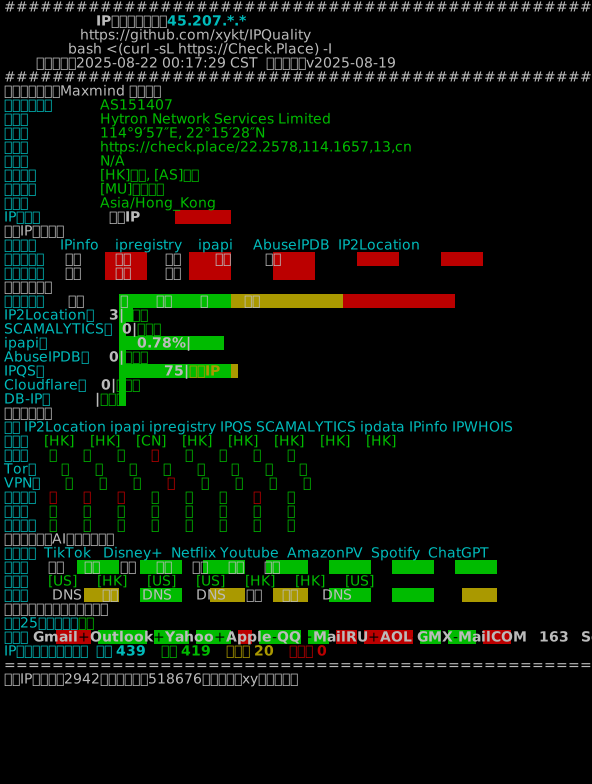
6.效果演示








大佬的好东西
https://dnsconfig.072899.xyz/
@Tionmon #2 你有jinx直接全部走jinx就行了
我一般是直接singbox出口走解锁鸡

@huai #1
你也写一篇分享
我也是,一把要解锁的网站走sing-box中转@huai #1
有用,加🍗
能不能机器1换DNS后解锁,在这样套到机器二?
@MikuQ #5 这样应该算是[教程]利用sni代理和smartdns自建DNS解锁 里的【高级玩法 玩法一 嵌套解锁】 吗?我不是很懂,你可以看一下
@杜会主乂 #7 刷帖子的时候看到了,还没怎么看这个,明天看看
@anyi #4