

// ==UserScript==
// @name         CloudCone Black Friday 监控器
// @namespace    http://tampermonkey.net/
// @version      1.0
// @description  每30秒检测 CloudCone Black Friday 优惠页面的内容变化,播放音频通知并弹出指定页面
// @match        https://app.cloudcone.com/events/blackfriday-offers
// @grant        GM_notification
// @grant        GM_log
// @grant        GM_setValue
// @grant        GM_getValue
// @grant        GM_info
// @grant        GM_openInTab
// ==/UserScript==

(function() {
    'use strict';

    const audioUrl = 'https://downsc.chinaz.net/Files/DownLoad/sound1/202301/y1479.mp3';
    const refreshInterval = 30 * 1000; // 30秒刷新一次
    const popupUrl = 'https://app.cloudcone.com/events/blackfriday';

    // 创建音频元素
    const audio = new Audio(audioUrl);

    // 添加视觉指示器
    function addVisualIndicator() {
        const indicator = document.createElement('div');
        indicator.id = 'script-indicator';
        indicator.style.cssText = `
            position: fixed;
            top: 10px;
            right: 10px;
            background-color: green;
            color: white;
            padding: 5px 10px;
            border-radius: 5px;
            z-index: 9999;
        `;
        indicator.textContent = '脚本正在运行';
        document.body.appendChild(indicator);
    }

    // 更新指示器
    function updateIndicator(text) {
        const indicator = document.getElementById('script-indicator');
        if (indicator) {
            indicator.textContent = text;
        }
    }

    // 获取当前时间的格式化字符串
    function getCurrentTime() {
        return new Date().toLocaleString('zh-CN', { hour12: false });
    }

    // 获取页面内容,忽略"ttr"后面的随机数字
    function getFilteredContent() {
        const clone = document.body.cloneNode(true);
        const content = clone.innerHTML;
        // 使用正则表达式替换"ttr"后面的数字为固定字符串
        return content.replace(/"ttr":\s*\d+/g, '"ttr": "IGNORED"');
    }

    // 记录日志
    function logEvent(message) {
        const currentTime = getCurrentTime();
        const logEntry = `${currentTime}: ${message}`;
        console.log(logEntry);

        // 获取现有日志
        let logs = GM_getValue('eventLogs', []);
        logs.push(logEntry);

        // 只保留最近的100条日志
        if (logs.length > 100) {
            logs = logs.slice(-100);
        }

        // 保存日志
        GM_setValue('eventLogs', logs);
    }

    function checkForChanges() {
        const currentContent = getFilteredContent();
        const lastContent = GM_getValue('lastContent', '');

        logEvent('检查页面变化');
        updateIndicator('正在检查变化...');

        if (lastContent && currentContent !== lastContent) {
            logEvent('检测到页面变化!');
            updateIndicator('检测到变化!');
            notifyChange();
        } else {
            updateIndicator('无变化');
        }

        GM_setValue('lastContent', currentContent);
    }

    function notifyChange() {
        GM_notification({
            title: 'CloudCone Black Friday 页面更新',
            text: '检测到页面内容发生了变化,可能有新的优惠!',
            timeout: 10000,
            onclick: function() {
                window.focus();
            }
        });

        // 播放音频
        audio.play().catch(e => console.error('音频播放失败:', e));

        // 弹出指定页面
        GM_openInTab(popupUrl, { active: true, insert: true, setParent: true });
    }

    function refreshAndCheck() {
        logEvent('刷新页面');
        updateIndicator('准备刷新...');
        setTimeout(() => location.reload(), 1000); // 延迟1秒刷新,以便看到指示器更新
    }

    // 显示日志
    function showLogs() {
        const logs = GM_getValue('eventLogs', []);
        console.log('事件日志:');
        logs.forEach(log => console.log(log));
    }

    console.log('脚本已加载', GM_info.script.version);

    // 页面加载完成后执行初始检查
    window.addEventListener('load', () => {
        logEvent('页面加载完成,执行初始检查');
        addVisualIndicator();
        checkForChanges();

        // 设置定期刷新和检查
        setInterval(refreshAndCheck, refreshInterval);

        // 添加显示日志的按钮
        const logButton = document.createElement('button');
        logButton.textContent = '显示日志';
        logButton.style.cssText = `
            position: fixed;
            bottom: 10px;
            right: 10px;
            z-index: 9999;
        `;
        logButton.onclick = showLogs;
        document.body.appendChild(logButton);
    });

    // 预加载音频
    audio.load();
})();
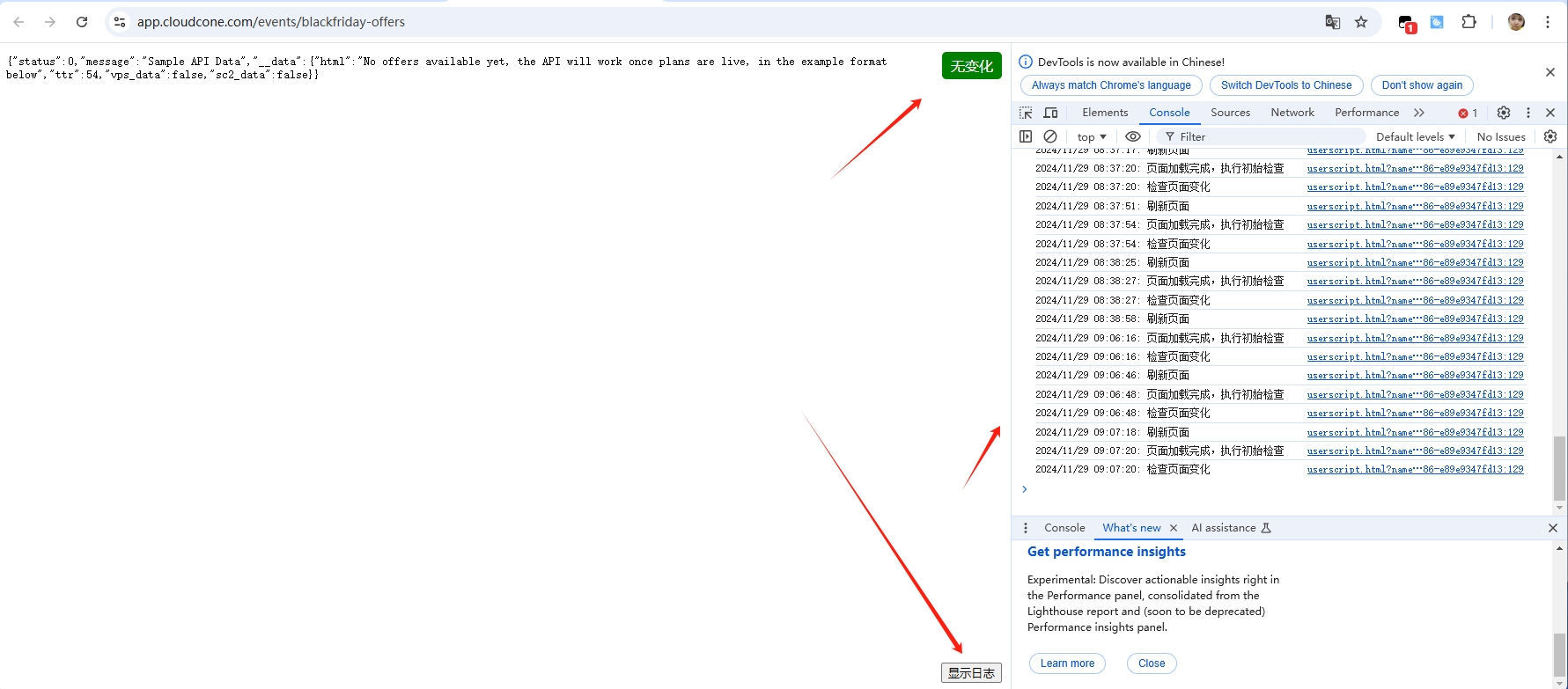
现在的ai 只需要你提要求他就能给你需要的 真的是太强大了 各位老大 检查下 看看否有什么问题








@sdo888 #1
MarsCode
哪个Ai
同感,不过报错还是需要调试