


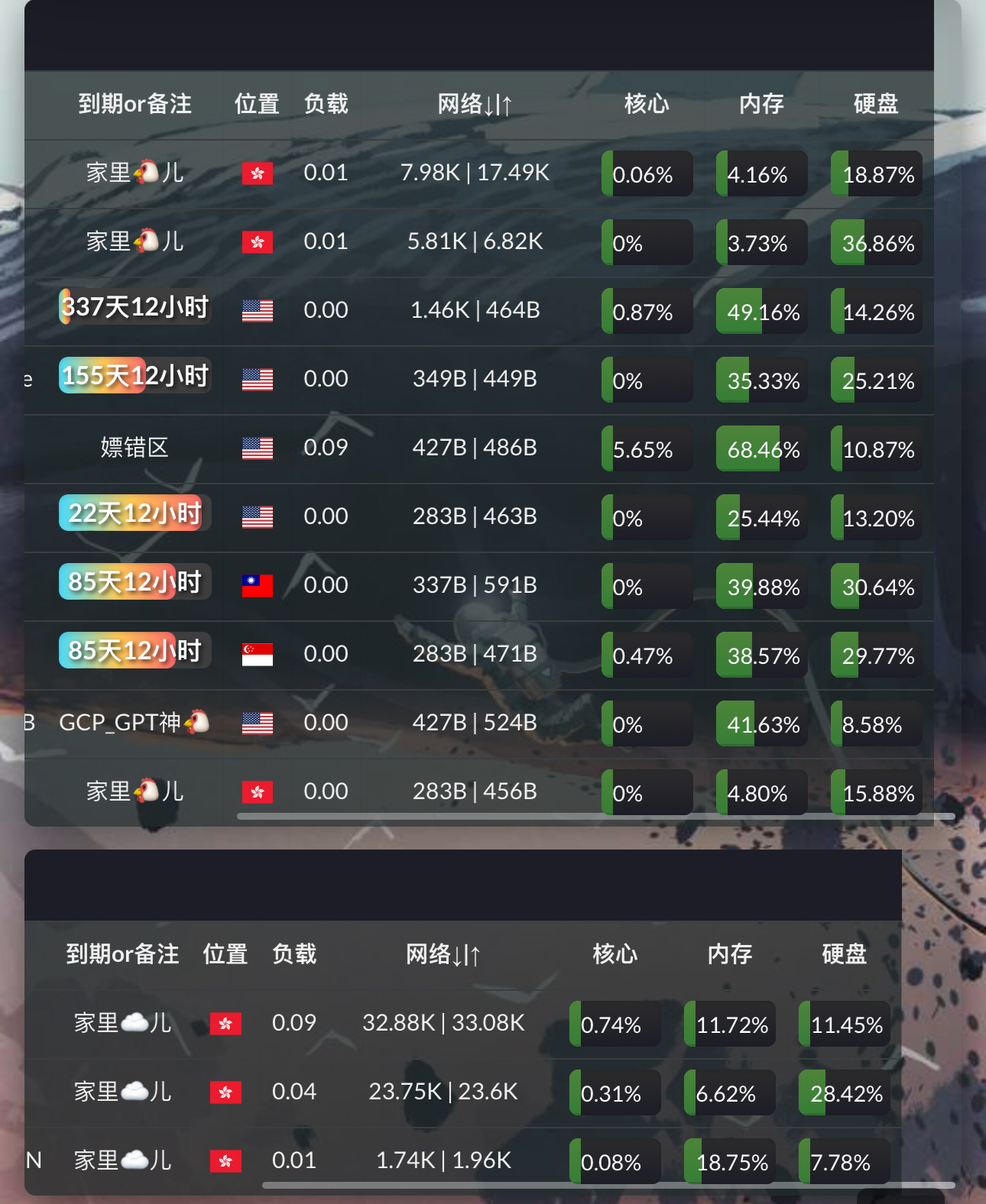
自己修改小鸡id,开始计算日期和结束日期
复制这个第一部分到设置一自定义代码
<script>
document.addEventListener('DOMContentLoaded', function() {
    var downtimeCells = document.querySelectorAll('th.node-cell.os.center');
    downtimeCells.forEach(function(cell) {
        // 创建一个新的 <th> 元素
        var newTh = document.createElement('th');
        // 添加 class 属性
        newTh.className = 'node-cell downtime center';
        // 设置新元素的文本内容
        newTh.textContent = '备注';
        // 将新元素插入到当前单元格的后面
        cell.parentNode.insertBefore(newTh, cell.nextSibling);
    });
});

document.addEventListener('DOMContentLoaded', function() {
    const affLinks = {
这部分的1是你小鸡的ID,然后更改时间,再贴在第一部分下面,可以根据情况添加
	   1: {
            startDate: new Date('2022-07-10T00:00:00+08:00'),
            expirationDate: new Date('2026-07-10T00:00:00+08:00'),
            content: {
                type: 'text',
                value: ''
            }
        },
填写完上面的内容后就把这个第三部分继续黏贴
  };
   const createLink = (linkConfig) => {
       const $link = document.createElement('a');
       $link.href = linkConfig.value;
       $link.textContent = linkConfig.label || linkConfig.value;

       if (linkConfig.icon) {
           const $icon = document.createElement('img');
           $icon.src = linkConfig.icon;
           $icon.alt = linkConfig.iconAlt || '';
           $link.appendChild($icon);
       }

       if (linkConfig.text) {
           const $text = document.createElement('span');
           $text.textContent = linkConfig.text;
           $link.appendChild(document.createTextNode(' '));
           $link.appendChild($text);
       }

       return $link;
   };

   const createIcon = (iconConfig) => {
       const $icon = document.createElement('img');
       $icon.src = iconConfig.value;
       $icon.alt = iconConfig.label || 'Icon';

       if (iconConfig.text) {
           const $text = document.createElement('span');
           $text.textContent = iconConfig.text;
           $icon.appendChild(document.createTextNode(' '));
           $icon.appendChild($text);
       }

       return $icon;
   };

   const createSmokeAnimation = () => {
       const $smokeContainer = document.createElement('div');
       $smokeContainer.className = 'smoke-container';

       for (let i = 0; i < 5; i++) {
           const $particle = document.createElement('div');
           $particle.className = 'smoke-particle';
           $smokeContainer.appendChild($particle);
       }

       return $smokeContainer;
   };

   const createCountdown = (startDate, expirationDate) => {
       const total = expirationDate.getTime() - startDate.getTime();

       const $countdownContainer = document.createElement('div');
       $countdownContainer.style.position = 'relative';
       $countdownContainer.style.width = '100%';
       $countdownContainer.style.backgroundColor = '#333';
       $countdownContainer.style.borderRadius = '5px';
       $countdownContainer.style.overflow = 'hidden';
       $countdownContainer.style.boxShadow = 'inset 0 1px 3px rgba(0,0,0,0.2), 0 1px 2px rgba(0,0,0,0.3)'; // 背景3D效果
       $countdownContainer.style.background = 'linear-gradient(to bottom, #444, #222)'; // 背景渐变效果

       const $progressBar = document.createElement('div');
       $progressBar.style.position = 'absolute';
       $progressBar.style.top = '0';
       $progressBar.style.left = '0';
       $progressBar.style.height = '100%';
       $progressBar.style.backgroundColor = '#388e3c'; // 调暗后的绿色进度条
       $progressBar.style.width = '0%';
       $progressBar.style.boxShadow = 'inset 0 1px 3px rgba(0,0,0,0.2), 0 1px 2px rgba(0,0,0,0.3)'; // 进度条3D效果

       const $countdownTime = document.createElement('span');
       $countdownTime.style.position = 'relative';
       $countdownTime.style.zIndex = '1';
       $countdownTime.style.color = '#fff'; // 恢复为白色字体
       $countdownTime.style.padding = '5px';
       $countdownTime.style.fontSize = '12px'; // 调小字体
       $countdownTime.textContent = ' ';

       const $smoke = createSmokeAnimation();

       const updateCountdown = () => {
           const now = new Date();
           const diff = now.getTime() - startDate.getTime();
           if (diff >= total) {
               clearInterval(countdownInterval);
               $countdownTime.textContent = '已过期';
               $progressBar.style.backgroundColor = '#c62828'; // 到期后的深红色进度条
               $progressBar.style.width = '100%';
               return;
           }

           const remainingDays = Math.ceil((total - diff) / (1000 * 60 * 60 * 24));
           $countdownTime.textContent = `${remainingDays}天`;
           const progress = 100 - (diff / total) * 100;
           $progressBar.style.width = `${progress}%`;

           // 更新烟雾动画的位置
           $smoke.style.left = `${progress}%`;
       };

       const countdownInterval = setInterval(updateCountdown, 1000);
       updateCountdown();

       $countdownContainer.appendChild($progressBar);
       $progressBar.appendChild($smoke);
       $countdownContainer.appendChild($countdownTime);

       return $countdownContainer;
   };

   const rows = document.querySelectorAll('tr');
   rows.forEach((row) => {
       let osCell = row.querySelector('td.node-cell.os.center');
       let downtimeCell = document.createElement('td');
       downtimeCell.classList.add('node-cell', 'downtime', 'center');
       let nodeId = row.id.substring(1);
       let affLink = affLinks[nodeId];
       if (!affLink) {
           affLink = {
               content: {
                   type: 'text',
                   value: '  '
               }
           };
       }
       if (osCell && affLink && affLink.content) {
           switch (affLink.content.type) {
               case 'link':
                   let link = createLink(affLink.content);
                   downtimeCell.appendChild(link);
                   break;
               case 'icon':
                   let icon = createIcon(affLink.content);
                   downtimeCell.appendChild(icon);
                   break;
               default:
                   let text = document.createTextNode(affLink.content.value);
                   downtimeCell.appendChild(text);
                   break;
           }

           if (affLink.startDate && affLink.expirationDate) {
               let countdown = createCountdown(affLink.startDate, affLink.expirationDate);
               downtimeCell.appendChild(countdown);
           }

           osCell.parentNode.insertBefore(downtimeCell, osCell.nextSibling);
       }
   });
});
</script>

<style>
@keyframes smoke {
   0% {
       transform: translateY(0) scale(1);
       opacity: 1;
   }
   100% {
       transform: translateY(-20px) scale(0.5);
       opacity: 0;
   }
}
.smoke-container {
   position: absolute;
   top: 0;
   right: 0;
   width: 10px;
   height: 100%;
   overflow: visible;
}
.smoke-particle {
   position: absolute;
   bottom: 0;
   width: 4px;
   height: 4px;
   background: rgba(144, 238, 144, 0.7); /* 淡绿色 */
   border-radius: 50%;
   animation: smoke 1s infinite;
}
.smoke-particle:nth-child(1) {
   left: 0;
   animation-delay: 0s;
}
.smoke-particle:nth-child(2) {
   left: 2px;
   animation-delay: 0.2s;
}
.smoke-particle:nth-child(3) {
   left: 4px;
   animation-delay: 0.4s;
}
.smoke-particle:nth-child(4) {
   left: 6px;
   animation-delay: 0.6s;
}
.smoke-particle:nth-child(5) {
   left: 8px;
   animation-delay: 0.8s;
}
</style>




还挺好看啊,改成海蓝色如何,加点螃蟹小虾大🐳
可以
你这个挺不错的呀,教程呢
@cute可爱 #3 贴上了
@Eric0321 #2 我比较喜欢简约,哈哈,你的是华丽
不错不错,很好看
@kwokzito #5 😂我就是原皮看腻了 花哨点 我去研究➕🐳了
叉眼了
MARK